 FlowPocket: Clipboard ManagerAll apps ↗
A clipboard shelf for iPad, iPhone & Mac
Keep it close.
Keep moving.
A place for the text, links, images and files between one app and the next. Gather what matters, then carry it into your next task.
Free for 8 cards · Optional Pro / Max
iOS / iPadOS 26+ · Mac: M1+, macOS 26+ (iPad app)

About FlowPocket
FlowPocket is a local clipboard manager for people who read, write and collect project references across iPad, iPhone and compatible Macs. It keeps text, links, images and files as cards; Pro/Max can export selected cards as Markdown or a ZIP materials pack with task instructions for an AI tool you choose. Automatic saving requires the app to be active, the setting enabled and clipboard access allowed; each device keeps its own library.
iPad / iPhone: system 26+ · Mac: M1+, macOS 26+, runs as an iPad app · 10 interface languages · Free: 8 cards; Pro/Max: export · Local libraries; no account, ads or third-party analytics.
App Store name in your region: FlowPocket: Clipboard Manager.
This is the official website for FlowPocket: Clipboard Manager on the App Store, developed by Shengxing Yang.
Content reviewed . References: App Store · Privacy policy · Apple Universal Clipboard
Guides

Made for the space between apps
Collect. See. Carry on.
Keep your references beside your work. A small shelf gives each item a place, with the newest first.
- 01
Bring it in.
Automatic saving is off by default. Copy something, then open FlowPocket. With automatic saving enabled and clipboard access allowed, it becomes a card while the app is active. You can also tap Paste or drag content in.
- 02
Give it context.
Preview a card, star what matters, and add a title or note to remember why you saved it. Editing the title leaves the saved filename unchanged.
- 03
Move it along.
Double-tap to copy, share, or drag into an app that accepts the content. With Pro/Max, select one or more cards and export a materials pack.
Markdown & ZIP · Pro / Max
Gather your material.
Give it a next step.
Turn selected text and links into a Markdown file. Include original images and files to make a ZIP materials pack, with titles, notes, recorded filenames, and optional sources and dates.
Add a task: Summarize key points, Compare materials, or Organize action items. Then give the pack to the AI tool you use.

Prepared on your device. FlowPocket does not run AI, upload to AI automatically, perform OCR or extract PDF text. Copy as Markdown is text only; export ZIP to include attachments.

Beside your work on iPad
Less switching.
More room to think.
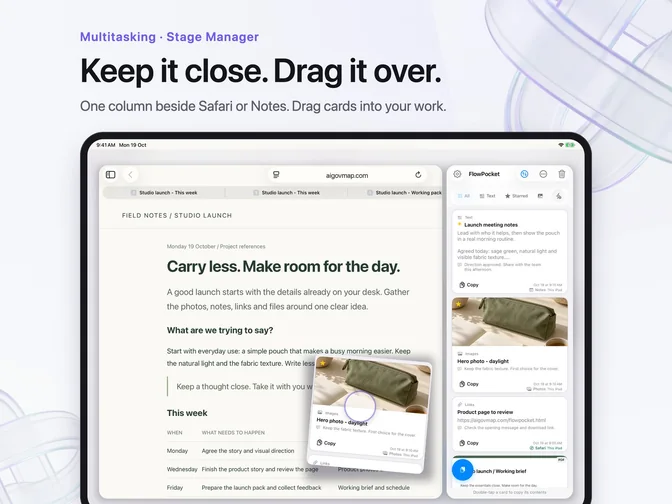
In a narrow Stage Manager or Split View window, the cards line up in one column beside your writing or reading. Copy, share, or drag a card into Notes, Mail, Files and other compatible apps.
What a destination accepts depends on the app and the type of content. The promotional composition illustrates the layout; it is not a recording of a live cross-app session.
A title. A note. A reason to keep it.
Remember why
you saved it.
A useful reference is more than a file. Add a title and a note to keep its context close, whether you are collecting on iPhone or working on a larger screen.
Titles and notes can travel with a Pro/Max export. The original saved filename stays unchanged.
Copy on one. Save on another.
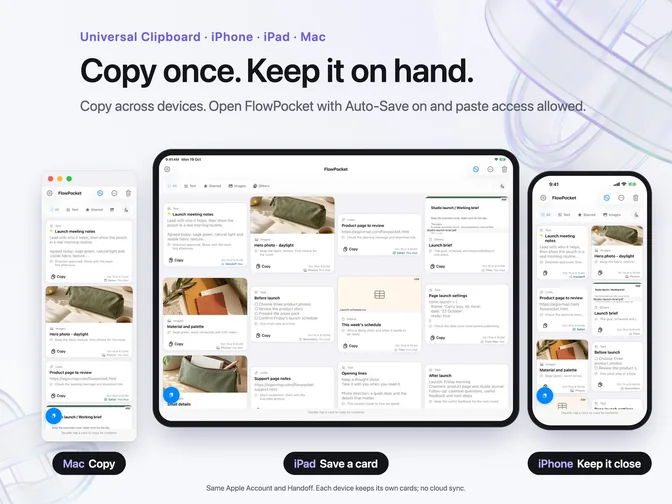
Automatic saving is off by default. Apple’s Universal Clipboard passes copied content between nearby Apple devices using the same Apple Account, with Wi-Fi, Bluetooth and Handoff on. Open FlowPocket on the receiving device; automatic saving also needs the setting and clipboard permission. Each device keeps its own cards, without library cloud sync.

Local by design
Your content,
on your device.
Cards and templates stay in the app’s local storage. No account, no ads, no third-party analytics, and no FlowPocket server receiving or syncing your card library.
Local storage can work offline. Importing a web image contacts its host; purchases and restores use Apple’s services. Content you choose to share or hand to an AI tool follows the recipient’s privacy policy.
This is a temporary workspace. Keep important material elsewhere too; removing the app can remove its local cards and attachments.
Read the privacy policy ↗Before you download
Made for system 26.
Requires iOS 26 or iPadOS 26 or later. On Mac, it runs as an iPad app on M1 or later with macOS 26 or later. The current App Store listing marks it as not verified for macOS.
10 interface languages: English, Simplified Chinese, Traditional Chinese, French, German, Spanish, Italian, Japanese, Korean and Brazilian Portuguese.
Free: up to 8 cards. Pro is a one-time purchase with unlimited cards, Markdown/ZIP export, 3 task presets and 1 custom template. Max adds unlimited custom templates, remembered export settings, and more colors and layouts. Check your regional App Store for prices.
A few useful details
Before it goes
in your pocket.
What is FlowPocket?
FlowPocket is a local clipboard manager for iPad, iPhone and compatible Macs. Collect text, links, images and files as cards for reading, writing and project research. Copy, share or drag them into compatible apps, or use Pro/Max to export selected cards.
Which devices and languages does it support?
Requires iOS 26 or iPadOS 26 or later. On Mac, FlowPocket runs as an iPad app on M1 or later with macOS 26 or later; the current App Store listing marks it as not verified for macOS. Version 1.1 supports 10 interface languages: English, Simplified Chinese, Traditional Chinese, French, German, Spanish, Italian, Japanese, Korean and Brazilian Portuguese.
Does it record the clipboard in the background?
Automatic saving is off by default. No. Automatic saving works while FlowPocket is active, with automatic saving enabled and clipboard access allowed. It is not an always-on background clipboard recorder. You can also use the paste button or drag content into the shelf.
Does it sync my cards through iCloud?
No. Apple’s Universal Clipboard transfers copied content between nearby devices signed in to the same Apple Account, with Wi-Fi, Bluetooth and Handoff on. Open FlowPocket on the receiving device to save it; automatic saving requires the enabled setting and clipboard access. Each device keeps an independent card library.
What can I export with Pro or Max?
Export one or more cards as Markdown (.md), or include original images and files to create a ZIP materials pack. Exports can include titles, notes, recorded original filenames, and optional sources and dates. Copy as Markdown contains text only; choose ZIP export for attachments.
Does FlowPocket run AI or read text from PDFs?
No. FlowPocket prepares the materials pack and task instructions locally. It does not call an AI service, automatically send your content to AI, perform OCR or extract PDF text. You choose whether to give the exported material to an AI tool; that tool’s own terms and privacy policy apply.
What is free, and what do Pro and Max add?
Free: up to 8 cards. Pro is a one-time purchase with unlimited cards, Markdown/ZIP export, 3 task presets and 1 custom template. Max adds unlimited custom templates, remembered export settings, and more colors and layouts. Check your regional App Store for prices.
Can I add titles and notes to cards?
Yes. Add a title and a note to keep context with a saved card. Changing a title does not rename the saved file. Pro/Max exports can include the title, note and original filename when it was recorded; they cannot recover a filename that was never saved.
How do I move a card into another app?
Double-tap to copy, use Share, or drag a card into a compatible destination such as Notes, Mail or Files. In a narrow iPad window, cards form a single column beside your work. Accepted content types depend on the destination app.
Is everything offline, and can I use it as an archive?
Cards and templates stay in local storage, with no account, ads, third-party analytics or FlowPocket library-sync server. Importing web images contacts their hosts; purchases and restores use Apple’s services; sharing you initiate sends the selected content to your chosen destination. FlowPocket is a temporary shelf. Keep important material separately, because removing the app can remove local data.
A little room between tasks
Give your next idea
a place to land.
Free for 8 cards · Optional Pro / Max
iOS / iPadOS 26+ · Mac: M1+, macOS 26+ (iPad app)